
CAD branching and merging: how it works for 2D drawings
How CAD branching and merging work on 2D drawings: what a branch really is, how a three-way merge decides what is safe, and when a human has to choose.
- #branching
- #merging
- #version-control
- #cad
Every drafter I've met has a private branching system. It looks like this: before
trying a risky change, duplicate the file, rename it site-plan_TEST.dwg, and hope
you remember next month which one is real. That instinct is correct. The tooling is
what's broken. CAD branching and merging is the same instinct with the bookkeeping
done by software instead of by filename, and in this post I want to explain how it
actually works on a 2D drawing: what a branch is, what happens at merge time, and
where drawings are genuinely harder to merge than code.
If you want the broader case for versioning drawings at all, start with what version control means for CAD. This post assumes you're sold on history and restore, and digs into the part people find mysterious.
What a branch actually is
A branch is not a copy of your file. That distinction carries the whole idea.
When you copy site-plan.dwg to site-plan_TEST.dwg, the copy forgets where it
came from. Two weeks later, both files have changed, and the only merge tool you
have is your own eyeballs, flipping between windows. Nobody enjoys that, so in
practice one file silently wins and the other one's work gets redone or lost.
A branch, by contrast, remembers its origin. It's a parallel line of history that knows exactly which version of the drawing it split from. You draw on the branch the same way you draw anywhere. The original keeps moving too, because the rest of the team didn't stop working. The shared starting point is what makes an automatic merge possible later, and it's the thing a file copy throws away.
Branches are cheap to make and cheap to delete. If the experiment fails, you throw the branch away and the main drawing never knew it existed. That changes behavior more than any feature: when trying something costs nothing, people try things.
How CAD branching and merging comes back together
The merge is where most people expect magic or disaster. It's neither. A merge has three inputs, which is why it's called a three-way merge:
- The base — the version where the branch split off.
- Yours — the drawing as it stands on your side.
- Theirs — the drawing as it stands on the other side.
With those three, the software can tell the difference between "changed" and "different". An entity that only one side touched is a clean change: it applies automatically, no questions asked. An entity that both sides changed since the base is a conflict, and no software should guess its way through one. A human picks which side wins, entity by entity.
In BranchCAD the merge view makes that split visible instead of burying it. Clean changes come in pre-applied with a tint so you can see what the merge did on its own. Conflicts are flagged in amber and sit there until you decide. When you commit, the merge is written as a new version on top of the current branch.
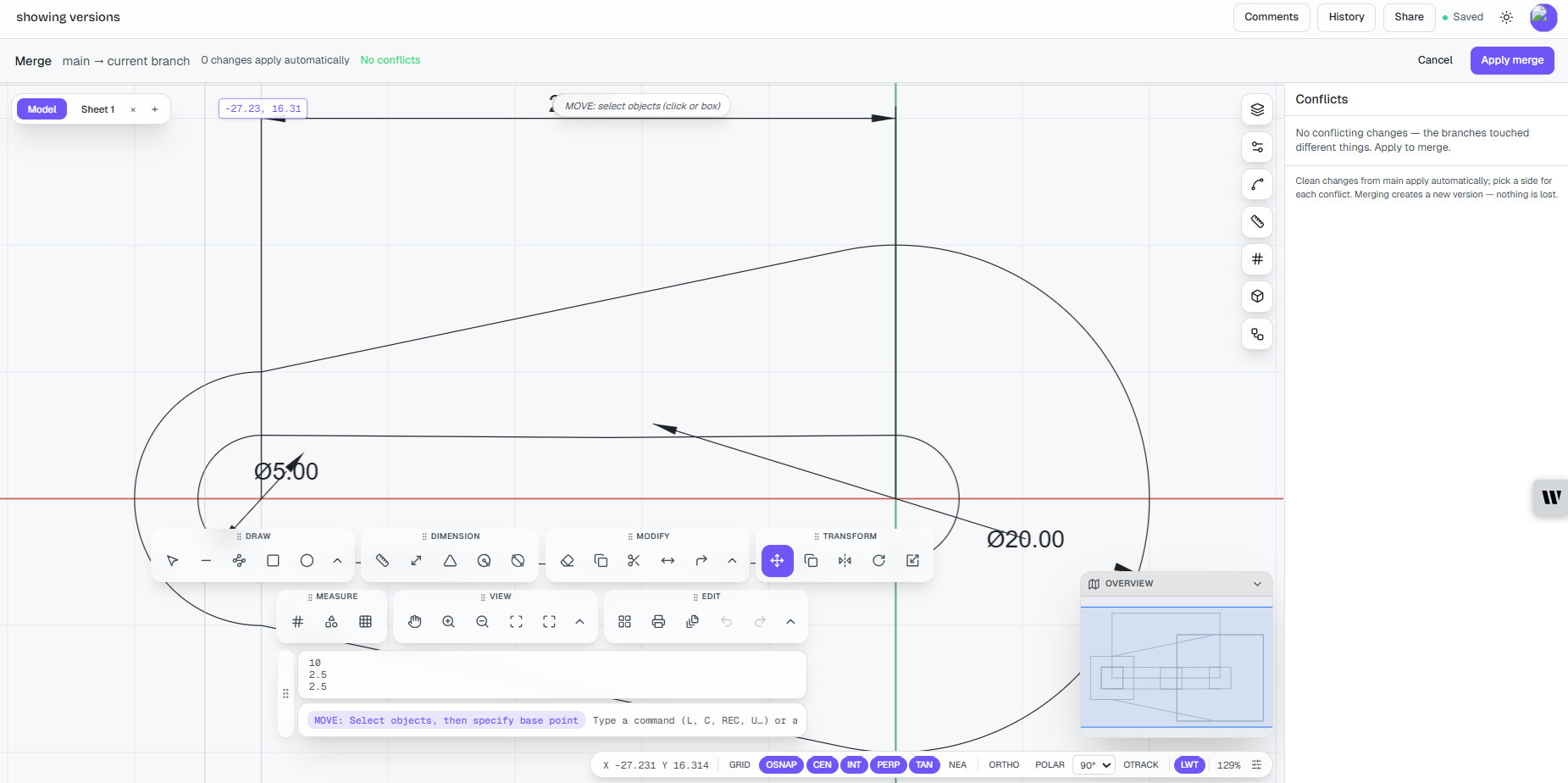
Nothing is destroyed. If the merge turns out to be wrong, the pre-merge state is still in history and restore is one click. I think of it as a forward-only rule: merges add versions, they never rewrite them.
A week on a real drawing
Here's the shape of it on an actual job, a drainage layout with two people on it:
* 9d41f2  Mon   branch "pump-option-B" created from v14        (Dana)
* 3c07aa  Tue   main: client adds easement, boundary revised   (Amir)
* f18e90  Wed   branch: pump relocated, new pipe run drawn     (Dana)
* 77b2c4  Fri   merge "pump-option-B" -> main                  (Dana)
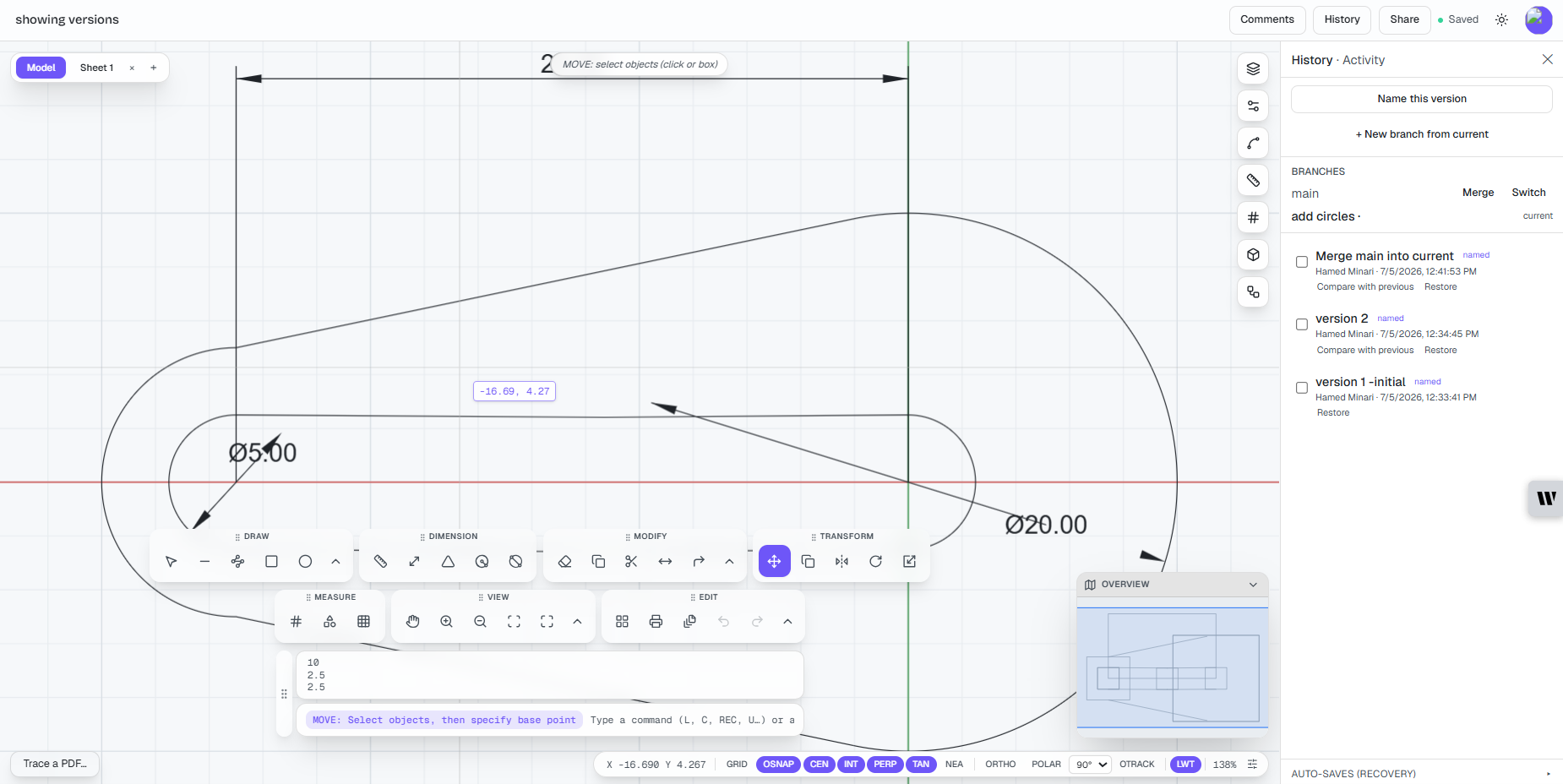
Dana spent the week on option B without touching the issued layout. Amir's easement change landed on main in the meantime. At merge time, the boundary revision and the pump run were clean changes, because each side touched different entities. Friday's merge was a five-minute job, not a weekend of copy-paste archaeology. That's the ordinary case, and it's worth saying out loud: most merges are boring. The workflow earns its keep on the boring ones.
One habit worth stealing from code review: read the merge before you commit it. The visual diff works on a pending merge, so you can walk the incoming changes the way a reviewer would and commit with the whole picture in your head. On a two-person drawing that takes a minute. On a busy one, it has caught merges that were clean by the rules and still wrong for the site, which is exactly the kind of wrong a tool can't judge for you.
Where drawings are harder to merge than code
I'll be straight about the limits, because the Git comparison breaks down in two places.
First, granularity. Code merges line by line. Drawings merge entity by entity. If you and I both rework the same polyline, the merge won't stitch our vertices into some hybrid; one version of that polyline wins, chosen by whoever resolves the conflict. Entity-level resolution is honest about that instead of pretending geometry can be interleaved like text.
Second, space. Geometry has dependencies no merge tool can see. If you move a wall on your branch and I chain dimensions off that wall on main, the merge may be technically clean while the drawing is wrong. The diff shows exactly what changed, which is precisely the review surface you need, but an engineer still has to look. A merge tool removes the mechanical pain of reconciliation. It does not replace checking. Anyone who tells you otherwise is selling something.
Both problems shrink with habits borrowed from software teams: keep branches short-lived, merge often so drift stays small, and split parallel work by area or layer when you can. Two people editing opposite corners of a site rarely conflict at all. I wrote more about what a collision actually looks like in CAD merge conflicts: what happens when two people edit the same drawing.
When you don't need branching
Also worth saying: if you draft alone and your work is linear, plain history with restore covers you, and that's not a lesser way to work. Branching starts paying rent when work is genuinely parallel. The three cases I see most:
- Options studies. Two layouts for the same site, developed at the same time,
compared, and the winner merged. No
_optionA_v3files anywhere. - Review gates. Changes are drawn on a branch and merged only after someone signs off. The branch becomes the unit of review, which is a drawing review workflow of its own.
- Fieldwork churn. The issued plan must stay stable while reality keeps editing the proposal. Geotech teams live this one; I wrote up the borehole location plan case separately.
Where this fits in BranchCAD
BranchCAD is 2D CAD in the browser with this model built in, not bolted on. Version history and one-click restore come with the Free plan, which keeps 30 days of history; paid plans keep it forever. Branching and the advanced visual diff arrive on Pro. And because collaboration is real-time, two people can sit in the same drawing while every edit is versioned underneath.
If the file-copy system in your projects folder has ever cost you an afternoon, compare the plans or just open the editor and branch a drawing. The first time you throw a failed experiment away without consequences, the habit sticks.