
Online CAD Software: A Better Way to Create, Review, and Manage 2D Drawings
Online CAD software has made 2D drafting accessible from almost anywhere. But the bigger opportunity is collaboration: branching, visual diffs, geometry-based comments, version history, and a better way to review drawings.
- #online CAD
- #CAD software
- #2D CAD
- #CAD review
- #CAD collaboration
- #CAD workflow
For years, the basic CAD workflow has looked almost exactly the same.
Someone creates a drawing.
Someone else reviews it.
The drawing gets exported to PDF.
An email is sent.
A reviewer adds markups.
The markups come back.
The drafter makes the changes.
Another PDF is created.
Then someone asks:
"Is this the latest version?"
Modern online CAD software has solved part of this problem. You can open a drawing in a browser, work from different locations, and share it without putting a CAD workstation on every desk.
But moving CAD into a browser is only the beginning.
The more interesting question is what happens when two or more people need to work on, review, change, and approve the same drawing.
That is where I think there is a much bigger opportunity for 2D CAD.
Instead of treating a drawing as a file that gets passed between people, treat each change as something that can be proposed, reviewed, discussed, and approved.
The idea is simple:
Branch → change → compare → comment → review → merge.
It is a workflow borrowed from software development, but the underlying idea works surprisingly well for CAD.
What is online CAD software?
At its simplest, online CAD software is CAD that runs through a web browser rather than requiring a traditional desktop installation.
That can mean different things depending on the product.
Some browser-based CAD tools are primarily viewers or lightweight editors. Others provide substantial drafting functionality. Some focus on 3D mechanical design, while others are designed specifically for 2D drawings.
For someone looking for CAD software online, the important question isn't simply:
"Does it run in a browser?"
A better set of questions is:
- Can I create accurate 2D drawings?
- Can I work with the file formats my clients use?
- Can I edit existing drawings?
- Can multiple people review the same drawing?
- Can I see exactly what changed?
- Can I keep a reliable revision history?
- Can I work with external clients or consultants?
- What happens when two people edit the same drawing?
- Can I eventually take the work back into a traditional CAD workflow?
Those questions matter much more than whether the software happens to have a browser interface.
Why traditional CAD review is still harder than it should be
Let's take a common example.
An engineer asks for a change to a site plan.
The designer opens the DWG and makes the revision.
They export a PDF and email it to the engineer.
The engineer reviews it and sends back a marked-up PDF.
The designer opens the original CAD drawing and works through the comments.
Then another PDF is exported.
The engineer reviews it again.
Nothing is particularly unusual about this process.
It is also not difficult to understand why people continue to use it.
PDFs are familiar. Email is familiar. Desktop CAD is familiar.
The problem is that the drawing and the review process are separated.
The reviewer is looking at one representation of the drawing.
The designer is working in another.
The conversation is happening somewhere else again.
And the version history is usually being reconstructed through filenames and folders.
That creates unnecessary work.
More importantly, it creates opportunities for mistakes.
A better CAD drawing review workflow
A different approach is to make the change itself the unit of review.
This is where the pull-request model becomes useful.
Not because CAD should become GitHub.
It shouldn't.
The useful part is the workflow:
- Create a branch.
- Make the change.
- Show the difference.
- Discuss the geometry.
- Review the change.
- Merge the approved version.
Here's what that looks like in practice.
1. Branch the drawing
Start with the current drawing and create a branch.
The original remains untouched.
The proposed revision happens on the branch.
Now there is a precise answer to:
"What am I reviewing?"
You aren't reviewing the entire drawing.
You're reviewing the changes made on this branch.
For a simple drawing, that distinction may not seem important.
For a drawing that has gone through dozens of revisions, it becomes extremely useful.
If you're unfamiliar with the concept, the CAD branching and merging guide explains the mechanics in more detail.
2. Make the change normally
The designer works as they normally would.
Move a wall.
Change a pipe run.
Add a dimension.
Modify a boundary.
Update a detail.
There is no special "review mode" required while making the change.
The important difference is that the work is isolated from the main version.
That means another person can continue working with the stable drawing while the proposed revision is being prepared.
3. Show exactly what changed
This is where an online CAD tool can provide a much better review experience.
Instead of asking a reviewer to compare two PDFs manually, show the differences directly on the drawing.
BranchCAD's visual diff identifies geometry that has been added, modified, or removed compared with the version from which the branch was created.
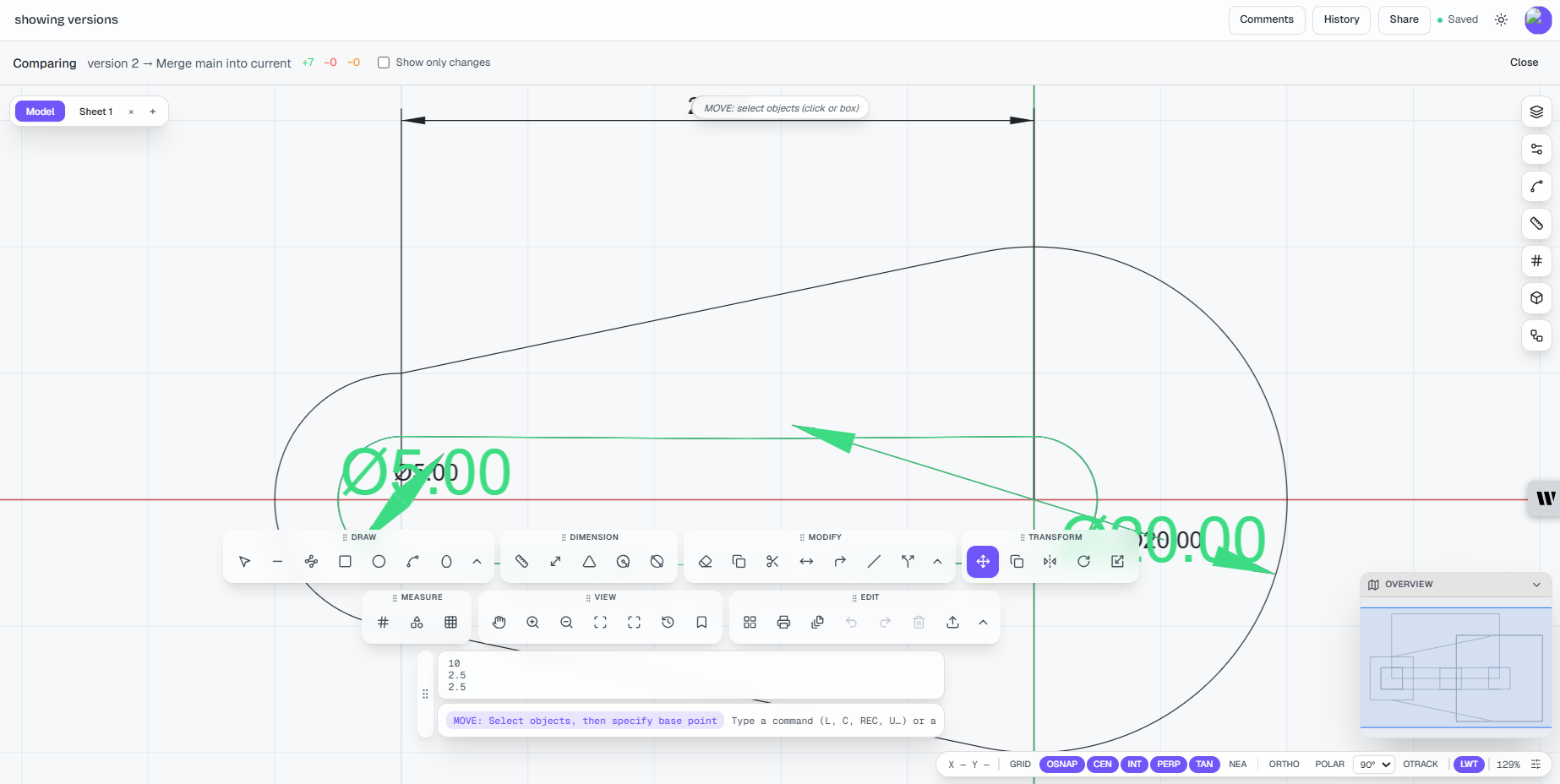
The reviewer doesn't need to search through two almost-identical drawings looking for a small revision.
The revision is the thing being displayed.
That sounds obvious.
It isn't how most CAD review workflows work today.
And it matters because the reviewer's time is usually much more valuable than the time required to find a changed line.
A reviewer should spend their time deciding whether the change is correct, not trying to discover where the change happened.
4. Comment on the geometry
A PDF markup can tell someone where a problem is.
A comment attached directly to the drawing can do something better: it can preserve the relationship between the comment and the thing being discussed.
For example:
"This offset looks tight."
If the comment is attached to the relevant geometry, there is no ambiguity about what "this" means.
The conversation stays with the drawing.
That becomes increasingly valuable as revisions accumulate.
Instead of:
"See my comment on page 3 of the revised PDF."
you have the discussion attached to the actual entity.
That is a small change in interface design, but potentially a big change in workflow.
5. Merge when the change is approved
Once the reviewer is satisfied, the branch can be merged.
This is an important part of the model.
Approval doesn't need to become another disconnected administrative step.
The merge represents the decision:
This proposed change has been reviewed and is now part of the main drawing.
The history can then preserve information such as:
- who created the change
- what changed
- who reviewed it
- when it was reviewed
- when it was merged
If two people have changed overlapping parts of the drawing, the system can also flag a conflict instead of silently allowing one change to overwrite another.
That is a much safer model than having two files called drawing_final.dwg and drawing_final_revised.dwg.
How BranchCAD compares with other 2D CAD software
This is where I think it is important to be honest.
There is no single "best CAD software."
Different products solve different problems.
If you're evaluating online CAD programs, you should choose based on your workflow rather than marketing claims.
Here's how I would think about the main categories.
| CAD approach | Best suited to | Main strength | Main limitation |
|---|---|---|---|
| Traditional desktop CAD | Professional drafting and established CAD workflows | Mature tools, deep functionality, offline work | Collaboration and revision workflows can require additional systems |
| AutoCAD Web | Existing AutoCAD users who need browser access | Familiar DWG workflow and AutoCAD ecosystem | It is a lighter web experience than full desktop AutoCAD |
| Browser-based 3D CAD | Collaborative mechanical/product design | Strong cloud collaboration and 3D workflows | Often more than a 2D drafter needs |
| Open-source desktop 2D CAD | Users wanting free/local software | Low cost, offline access, open-source options | Collaboration and cloud workflows are generally less central |
| Lightweight online CAD | Quick browser-based drafting and sharing | Accessibility and easy sharing | May lack advanced professional CAD features |
| BranchCAD | Teams primarily working with 2D CAD who want modern collaboration | 2D drafting + branching + visual diff + review + version history | Newer product with a smaller ecosystem than established CAD platforms |
That last point is important.
BranchCAD isn't trying to replace every CAD system.
If you need the enormous ecosystem surrounding a mature desktop CAD platform, a traditional solution may still be the better choice.
If you need sophisticated 3D parametric modelling, a dedicated 3D CAD platform will probably make more sense.
If you need a completely free, local, open-source 2D CAD application, there are established options worth considering.
The interesting gap is somewhere else:
professional 2D CAD teams that want the simplicity of browser software without giving up a serious workflow for revisions and collaboration.
That's the problem BranchCAD is trying to solve.
BranchCAD vs traditional desktop 2D CAD
Traditional desktop CAD still has some very real advantages.
It is mature.
It has decades of accumulated commands, workflows, integrations, plugins, blocks, templates, standards, training material, and third-party tools.
For a professional who has spent years working in a particular CAD environment, that matters.
You shouldn't move to an online CAD program simply because "cloud" sounds modern.
If your existing workflow works well, there may be no compelling reason to change it.
The question becomes different when collaboration starts consuming time.
For example:
Traditional workflow
Designer → DWG → PDF → Email → Review → Markup → Designer → PDF
BranchCAD-style workflow
Designer → Branch → Change → Visual Diff → Comment → Review → Merge
The second workflow isn't automatically better for every project.
But when several people repeatedly review the same drawings, the difference can become significant.
BranchCAD vs AutoCAD Web
AutoCAD Web is important to mention because it demonstrates that browser-based 2D CAD is already a real category, not a theoretical idea.
Autodesk's current documentation describes AutoCAD Web as providing core AutoCAD commands and fundamental drafting capabilities through the web and mobile, including editing DWG files, layers, dimensions, blocks, external references, measurements and review workflows.
That makes AutoCAD Web a sensible choice for someone who is already deeply invested in the Autodesk ecosystem and mainly wants access to their drawings away from a desktop installation.
BranchCAD takes a different approach.
Rather than starting with:
"How do we put traditional CAD in a browser?"
the focus is:
"What should collaborative 2D CAD look like if we design the workflow around revisions from the beginning?"
That's why branching, visual diffs, comments and merging are central to BranchCAD.
It is a different emphasis, not a claim that one product is universally superior.
BranchCAD vs free desktop 2D CAD
There is also a large group of users who don't necessarily need commercial CAD software.
Open-source and free desktop tools can be excellent choices for people who need basic 2D drafting without paying for a subscription.
If your priority is:
"I want a free CAD program installed on my computer and I don't need online collaboration,"
a local 2D CAD application may be the better choice.
If your priority is:
"I want to work in a browser, share drawings easily, and have the revision history and collaboration workflow built into the CAD environment,"
then an online CAD application becomes much more interesting.
The decision isn't really about which software has the longest feature list.
It's about what problem you're trying to solve.
What BranchCAD is deliberately not trying to be
This is worth saying explicitly.
BranchCAD isn't trying to be the answer to every CAD problem.
It isn't a replacement for every feature in a mature enterprise CAD platform.
It isn't primarily a 3D mechanical modelling system.
It isn't trying to compete with every specialist engineering application.
And if your company has spent years building an extensive desktop CAD ecosystem, migrating everything immediately probably isn't sensible.
The better use case is narrower.
2D CAD teams that want a simpler, more collaborative way to create and review drawings.
That focus is intentional.
A smaller product can sometimes move faster precisely because it isn't trying to reproduce every feature accumulated by a 30-year-old software platform.
What should you look for when choosing online CAD software?
If you're currently comparing CAD software online, I'd suggest ignoring the feature-count race for a moment.
Ask these questions instead.
1. Does it handle the drawings you actually use?
Don't test it with a simple rectangle.
Take a real project.
Open a representative drawing.
See what happens to layers, dimensions, blocks, annotations, references and other objects you rely on.
2. Can you get your work back out?
Cloud software should not mean your data is trapped.
Check what file formats you can import and export and how well those files survive the round trip.
3. How does collaboration actually work?
"Cloud-based" doesn't necessarily mean collaborative.
Can another person review the drawing?
Can they comment?
Can you see what changed?
Can you identify who made the change?
4. What happens to revisions?
This is one of the questions I would ask before almost anything else.
If you have to create drawing_v2, drawing_v3, drawing_v4, and drawing_v4_final, the software isn't really solving version management.
5. What happens when two people edit the same thing?
This is where a lot of collaboration claims become less impressive.
Real collaboration needs a strategy for conflicting changes.
6. Can external people review the drawing easily?
A client or consultant shouldn't necessarily need to install your CAD software just to look at a drawing.
7. Does the software fit your existing workflow?
The best online CAD program isn't necessarily the one with the most features.
It's the one that removes the most friction from the work you actually do.
Frequently asked questions about online CAD software
What is the best online CAD software?
There isn't one answer for everyone.
If you need browser-based access to an established DWG workflow, AutoCAD Web is an obvious option to evaluate.
If you need collaborative 3D design, a browser-based 3D CAD platform may be more appropriate.
If you want free local 2D drafting, desktop open-source options may be a better fit.
If you primarily work in 2D and want branching, visual comparison, comments and version history integrated into the workflow, BranchCAD is designed specifically around that use case.
The right choice depends on what you actually need.
Is online CAD as good as desktop CAD?
Not universally.
Desktop CAD still has advantages in mature functionality, integrations, performance for some workflows, offline access and specialist features.
Online CAD has a different set of advantages: accessibility, easier sharing, centralized files and the potential for better collaboration.
For some users, desktop CAD will remain the better choice.
For others, especially teams doing collaborative 2D work, an online CAD workflow can be a better fit.
Can I use online CAD for professional work?
Yes, but you should evaluate the specific software rather than assuming every browser CAD application is professional enough for your work.
Test it with real drawings.
Check file compatibility.
Check precision.
Check dimensions and annotations.
Check export quality.
Check whether the collaboration and revision features meet your QA requirements.
For professional work, "it runs in Chrome" isn't a sufficient evaluation.
Is online CAD free?
Some online CAD programs offer free plans or trials, while others require a subscription.
There is also an important distinction between "free to try" and "free for ongoing commercial use."
Before moving a business workflow to a free CAD program, check the licensing terms carefully.
The cheapest software isn't necessarily the cheapest workflow if your team spends hours dealing with manual file management and review.
Can online CAD replace AutoCAD?
For some users, potentially.
For everyone, no.
AutoCAD has an enormous ecosystem and a very mature set of capabilities.
A lightweight 2D online CAD tool should not pretend to replace every AutoCAD workflow.
If you use a large number of specialized AutoCAD features, plugins, vertical products, or established company standards, staying with AutoCAD may be the sensible decision.
If you primarily need 2D drafting and want a more modern collaborative workflow, an alternative may be worth testing.
Is browser-based CAD accurate enough for engineering drawings?
A browser interface does not inherently make CAD less accurate.
The more important questions are how the software handles geometry, units, snapping, dimensions, precision, file formats and export.
For engineering work, test the software against your actual requirements rather than judging it based on whether it runs in a browser.
What is the advantage of an online CAD editor?
The obvious advantage is accessibility.
You can work without installing a traditional desktop application and can potentially access drawings from different computers and locations.
But I think the larger opportunity is collaboration.
A good online CAD editor can bring the drawing, sharing, comments, revision history and review process into one environment.
That is much more interesting than simply replacing a desktop icon with a browser tab.
Is BranchCAD a replacement for traditional CAD?
Not in every situation.
BranchCAD is focused on 2D CAD and collaborative workflows.
If you need advanced 3D modelling, highly specialized engineering tools, or a large ecosystem of legacy plugins, another CAD platform may be a better choice.
If your pain is mainly around 2D drafting, revisions, collaboration and drawing review, that's where BranchCAD is intended to fit.
Why use branches for CAD drawings?
Because a branch gives a proposed change a defined boundary.
Instead of asking:
"What changed in this drawing?"
you can ask:
"What changed on this branch?"
That makes the review smaller, clearer and easier to understand.
It also gives teams a safer place to experiment without immediately changing the main drawing.
Does a visual diff prove that a drawing is correct?
No.
And it shouldn't pretend to.
A visual diff tells you what changed.
It doesn't tell you whether the engineering decision behind the change was correct.
The reviewer still needs to apply professional judgment.
The benefit is that the reviewer can spend more of that time on the actual engineering question instead of finding and reconstructing the changes.
The bigger opportunity for 2D CAD
I don't think the future of CAD is simply:
"Put desktop CAD in a browser."
That's useful, but it's not particularly ambitious.
The more interesting question is what happens when the CAD system is designed around the way teams actually work.
A drawing isn't just geometry.
It has authors.
It has revisions.
It has decisions.
It has comments.
It has approvals.
It has history.
And, most importantly, it has people working on it.
Traditional CAD has become exceptionally good at creating geometry.
The next generation of online CAD software has an opportunity to become much better at managing everything that happens around that geometry.
That means making changes visible.
Keeping discussions connected to the drawing.
Making revisions understandable.
Reducing unnecessary file copies.
Making approval explicit.
And giving teams a reliable history of how a drawing got from one version to the next.
That's the idea behind BranchCAD.
Not "CAD, but online."
2D CAD built around the way modern teams collaborate.
Try it on a real drawing
You don't need to move your entire CAD workflow to test a different approach.
Take one real 2D drawing.
Create a branch.
Make a small change.
Open the visual diff.
Add a review comment.
Then merge the change.
Compare that experience with the way you currently review a drawing.
If the new workflow saves you from one unnecessary PDF, one confusing email, or one conversation about which file is actually the latest version, you've already found a reason to keep exploring it.
Branching, merging and advanced visual diff are available on the BranchCAD Pro plan. You can see the current plan details on the pricing page.
You can also open BranchCAD in your browser and try the workflow yourself.
The best way to decide whether an online CAD tool is useful isn't to read another feature list.
Put one of your real drawings into it and see what happens.